 06733cb2cb
## Stripe Payment Integration
- Add Express.js backend server with Stripe Checkout Sessions
- Create SQLite database for order tracking
- Implement Stripe webhook handlers for payment events
- Integrate with Wren Climate API for carbon offset fulfillment
- Add CheckoutSuccess and CheckoutCancel pages
- Create checkout API client for frontend
- Update OffsetOrder component to redirect to Stripe Checkout
- Add processing fee calculation (3% of base amount)
- Implement order status tracking (pending → paid → fulfilled)

Backend (server/):
- Express server with CORS and middleware
- SQLite database with Order schema
- Stripe configuration and client
- Order CRUD operations model
- Checkout session creation endpoint
- Webhook handler for payment confirmation
- Wren API client for offset fulfillment

Frontend:
- CheckoutSuccess page with order details display
- CheckoutCancel page with retry encouragement
- Updated OffsetOrder to use Stripe checkout flow
- Added checkout routes to App.tsx
- TypeScript interfaces for checkout flow

## Visual & UX Enhancements
- Add CertificationBadge component for project verification status
- Create PortfolioDonutChart for visual portfolio allocation
- Implement RadialProgress for percentage displays
- Add reusable form components (FormInput, FormTextarea, FormSelect, FormFieldWrapper)
- Refactor OffsetOrder with improved layout and animations
- Add offset percentage slider with visual feedback
- Enhance MobileOffsetOrder with better responsive design
- Improve TripCalculator with cleaner UI structure
- Update CurrencySelect with better styling
- Add portfolio distribution visualization
- Enhance project cards with hover effects and animations
- Improve color palette and gradient usage throughout

## Configuration
- Add VITE_API_BASE_URL environment variable
- Create backend .env.example template
- Update frontend .env.example with API URL
- Add Stripe documentation references

🤖 Generated with [Claude Code](https://claude.com/claude-code)

Co-Authored-By: Claude <noreply@anthropic.com>
67 KiB
Elements Appearance API
Customize the look and feel of Elements to match the design of your site.
Stripe Elements supports visual customization, which allows you to match the design of your site with the appearance option. The layout of each Element stays consistent, but you can modify colors, fonts, borders, padding, and more.
- Pick a prebuilt theme that most closely resembles your website.
- Customize the theme using inputs and labels. You can also set variables, such as the
fontFamilyandcolorPrimaryto broadly customize components appearing throughout each Element. - If needed, fine-tune individual components and states using rules.
For complete control, specify custom CSS properties for individual components appearing in the Element.
The Elements Appearance API doesn’t support individual payment method Elements (such as
CardElement). Use the Style object to customize your Element instead.
Themes
Start customizing Elements by selecting one of the following themes:
stripenightflat
Checkout Sessions API
const appearance = {
  theme: 'night'
};

// Pass the appearance object when initializing checkout
const checkout = stripe.initCheckout({clientSecret, elementsOptions: {appearance}});
Payment Intents API
const appearance = {
  theme: 'night'
};

// Pass the appearance object to the Elements instance
const elements = stripe.elements({clientSecret, appearance});
Inputs and labels
Customize the appearance of input fields and their associated labels.
const appearance = { inputs: 'spaced', labels: 'auto' }
Inputs
Choose the style of input fields to suit your design.
| Variant | Description |
|---|---|
spaced |
Each input field has space surrounding it. This is the default option. |
condensed |
Related input fields are grouped together without space between them. |
Labels
Control the position and visibility of labels associated with input fields.
| Variant | Description |
|---|---|
auto |
Labels adjust based on the input variant. When inputs are spaced, labels are above. When inputs are condensed, labels are floating. This is the default option. |
above |
Labels are positioned above the corresponding input fields. |
floating |
Labels float within the input fields. |
Variables
Set variables to affect the appearance of many components appearing throughout each Element.

The variables option works like CSS variables. You can specify CSS values for each variable and reference other variables with the var(--myVariable) syntax. You can even inspect the resulting DOM using the DOM explorer in your browser.
Checkout Sessions API
const appearance = {
  theme: 'stripe',

  variables: {
    colorPrimary: '#0570de',
    colorBackground: '#ffffff',
    colorText: '#30313d',
    colorDanger: '#df1b41',
    fontFamily: 'Ideal Sans, system-ui, sans-serif',
    spacingUnit: '2px',
    borderRadius: '4px',
    // See all possible variables below
  }
};

// Pass the appearance object when initializing checkout
const checkout = stripe.initCheckout({clientSecret, elementsOptions: {appearance}});
Payment Intents API
const appearance = {
  theme: 'stripe',

  variables: {
    colorPrimary: '#0570de',
    colorBackground: '#ffffff',
    colorText: '#30313d',
    colorDanger: '#df1b41',
    fontFamily: 'Ideal Sans, system-ui, sans-serif',
    spacingUnit: '2px',
    borderRadius: '4px',
    // See all possible variables below
  }
};

// Pass the appearance object to the Elements instance
const elements = stripe.elements({clientSecret, appearance});
Commonly used variables
| Variable | Description |
|---|---|
fontFamily |
The font family used throughout Elements. Elements supports custom fonts by passing the fonts option to the Elements group. |
fontSizeBase |
The font size that’s set on the root of the Element. By default, other font size variables such as fontSizeXs or fontSizeSm are scaled from this value using rem units. Make sure that you choose a font size of at least 16px for input fields on mobile. |
spacingUnit |
The base spacing unit that all other spacing is derived from. Increase or decrease this value to make your layout more or less spacious. |
borderRadius |
The border radius used for tabs, inputs, and other components in the Element. |
colorPrimary |
A primary color used throughout the Element. Set this to your primary brand color. |
colorBackground |
The color used for the background of inputs, tabs, and other components in the Element. |
colorText |
The default text color used in the Element. |
colorDanger |
A color used to indicate errors or destructive actions in the Element. |
Less commonly used variables
| Variable | Description |
|---|---|
buttonBorderRadius |
The border radius used for buttons. By default, buttons use borderRadius. |
fontSmooth |
What text anti-aliasing settings to use in the Element. It can be always, auto, or never. |
fontVariantLigatures |
The font-variant-ligatures setting of text in the Element. |
fontVariationSettings |
The font-variation-settings setting of text in the Element. |
fontWeightLight |
The font weight used for light text. |
fontWeightNormal |
The font weight used for normal text. |
fontWeightMedium |
The font weight used for medium text. |
fontWeightBold |
The font weight used for bold text. |
fontLineHeight |
The line-height setting of text in the Element. |
fontSizeXl |
The font size of extra-large text in the Element. By default this is scaled from var(--fontSizeBase) using rem units. |
fontSizeLg |
The font size of large text in the Element. By default this is scaled from var(--fontSizeBase) using rem units. |
fontSizeSm |
The font size of small text in the Element. By default this is scaled from var(--fontSizeBase) using rem units. |
fontSizeXs |
The font size of extra-small text in the Element. By default this is scaled from var(--fontSizeBase) using rem units. |
fontSize2Xs |
The font size of double-extra small text in the Element. By default this is scaled from var(--fontSizeBase) using rem units. |
fontSize3Xs |
The font size of triple-extra small text in the Element. By default this is scaled from var(--fontSizeBase) using rem units. |
logoColor |
A preference for which logo variations to display; either light or dark. |
tabLogoColor |
The logo variation to display inside .Tab components; either light or dark. |
tabLogoSelectedColor |
The logo variation to display inside the .Tab--selected component; either light or dark. |
blockLogoColor |
The logo variation to display inside .Block components; either light or dark. |
colorSuccess |
A color used to indicate positive actions or successful results in the Element. |
colorWarning |
A color used to indicate potentially destructive actions in the Element. |
accessibleColorOnColorPrimary |
The color of text appearing on top of any var(--colorPrimary) background. |
accessibleColorOnColorBackground |
The color of text appearing on top of any var(--colorBackground) background. |
accessibleColorOnColorSuccess |
The color of text appearing on top of any var(--colorSuccess) background. |
accessibleColorOnColorDanger |
The color of text appearing on top of any var(--colorDanger) background. |
accessibleColorOnColorWarning |
The color of text appearing on top of any var(--colorWarning) background. |
colorTextSecondary |
The color used for text of secondary importance. For example, this color is used for the label of a tab that isn’t currently selected. |
colorTextPlaceholder |
The color used for input placeholder text in the Element. |
iconColor |
The default color used for icons in the Element, such as the icon appearing in the card tab. |
iconHoverColor |
The color of icons when hovered. |
iconCardErrorColor |
The color of the card icon when it’s in an error state. |
iconCardCvcColor |
The color of the CVC variant of the card icon. |
iconCardCvcErrorColor |
The color of the CVC variant of the card icon when the CVC field has invalid input. |
iconCheckmarkColor |
The color of checkmarks displayed within components like .Checkbox. |
iconChevronDownColor |
The color of arrow icons displayed within select inputs. |
iconChevronDownHoverColor |
The color of arrow icons when hovered. |
iconCloseColor |
The color of close icons, used for indicating a dismissal or close action. |
iconCloseHoverColor |
The color of close icons when hovered. |
iconLoadingIndicatorColor |
The color of the spinner in loading indicators. |
iconMenuColor |
The color of menu icons used to indicate a set of additional actions. |
iconMenuHoverColor |
The color of menu icons when hovered. |
iconMenuOpenColor |
The color of menu icons when opened. |
iconPasscodeDeviceColor |
The color of the passcode device icon, used to indicate a message has been sent to the user’s mobile device. |
iconPasscodeDeviceHoverColor |
The color of the passcode device icon when hovered. |
iconPasscodeDeviceNotificationColor |
The color of the notification indicator displayed over the passcode device icon. |
iconRedirectColor |
The color of the redirect icon that appears for redirect-based payment methods. |
tabIconColor |
The color of icons appearing in a tab. |
tabIconHoverColor |
The color of icons appearing in a tab when the tab is hovered. |
tabIconSelectedColor |
The color of icons appearing in a tab when the tab is selected. |
tabIconMoreColor |
The color of the icon that appears in the trigger for the additional payment methods menu. |
tabIconMoreHoverColor |
The color of the icon that appears in the trigger for the additional payment methods menu when the trigger is hovered. |
accordionItemSpacing |
The vertical spacing between .AccordionItem components. This is only applicable when spacedAccordionItems is true. |
gridColumnSpacing |
The spacing between columns in the grid used for the Element layout. |
gridRowSpacing |
The spacing between rows in the grid used for the Element layout. |
pickerItemSpacing |
The spacing between .PickerItem components rendered within the .Picker component. |
tabSpacing |
The horizontal spacing between .Tab components. |
Rules
The rules option is a map of CSS-like selectors to CSS properties, allowing granular customization of individual components. After defining your theme and variables, use rules to seamlessly integrate Elements to match the design of your site.
Checkout Session API
  const appearance = {
    rules: {
      '.Tab': {
        border: '1px solid #E0E6EB',
        boxShadow: '0px 1px 1px rgba(0, 0, 0, 0.03), 0px 3px 6px rgba(18, 42, 66, 0.02)',
      },

      '.Tab:hover': {
        color: 'var(--colorText)',
      },

      '.Tab--selected': {
        borderColor: '#E0E6EB',
        boxShadow: '0px 1px 1px rgba(0, 0, 0, 0.03), 0px 3px 6px rgba(18, 42, 66, 0.02), 0 0 0 2px var(--colorPrimary)',
      },

      '.Input--invalid': {
        boxShadow: '0 1px 1px 0 rgba(0, 0, 0, 0.07), 0 0 0 2px var(--colorDanger)',
      },

      // See all supported class names and selector syntax below
    }
  };

// Pass the appearance object when initializing checkout
const checkout = stripe.initCheckout({clientSecret, elementsOptions: {appearance}});
Payment Intents API
  const appearance = {
    rules: {
      '.Tab': {
        border: '1px solid #E0E6EB',
        boxShadow: '0px 1px 1px rgba(0, 0, 0, 0.03), 0px 3px 6px rgba(18, 42, 66, 0.02)',
      },

      '.Tab:hover': {
        color: 'var(--colorText)',
      },

      '.Tab--selected': {
        borderColor: '#E0E6EB',
        boxShadow: '0px 1px 1px rgba(0, 0, 0, 0.03), 0px 3px 6px rgba(18, 42, 66, 0.02), 0 0 0 2px var(--colorPrimary)',
      },

      '.Input--invalid': {
        boxShadow: '0 1px 1px 0 rgba(0, 0, 0, 0.07), 0 0 0 2px var(--colorDanger)',
      },

      // See all supported class names and selector syntax below
    }
  };

// Pass the appearance object to the Elements instance
const elements = stripe.elements({clientSecret, appearance});
All rules
The selector for a rule can target any of the public class names in the Element, as well as the supported states, pseudo-classes, and pseudo-elements for each class. For example, the following are valid selectors:
.Tab, .Label, .Input.Tab:focus.Input--invalid, .Label--invalid.Input::placeholder
The following are not valid selectors:
.p-SomePrivateClass, img, only public class names can be targeted.Tab .TabLabel, ancestor-descendant relationships in selectors are unsupported.Tab--invalid, the.Tabclass does not support the--invalidstate
Each class name used in a selector supports an allowlist of CSS properties, that you specify using camel case (for example, boxShadow for the box-shadow property).
The following is the complete list of supported class names and corresponding states, pseudo-classes, and pseudo-elements.
Tabs
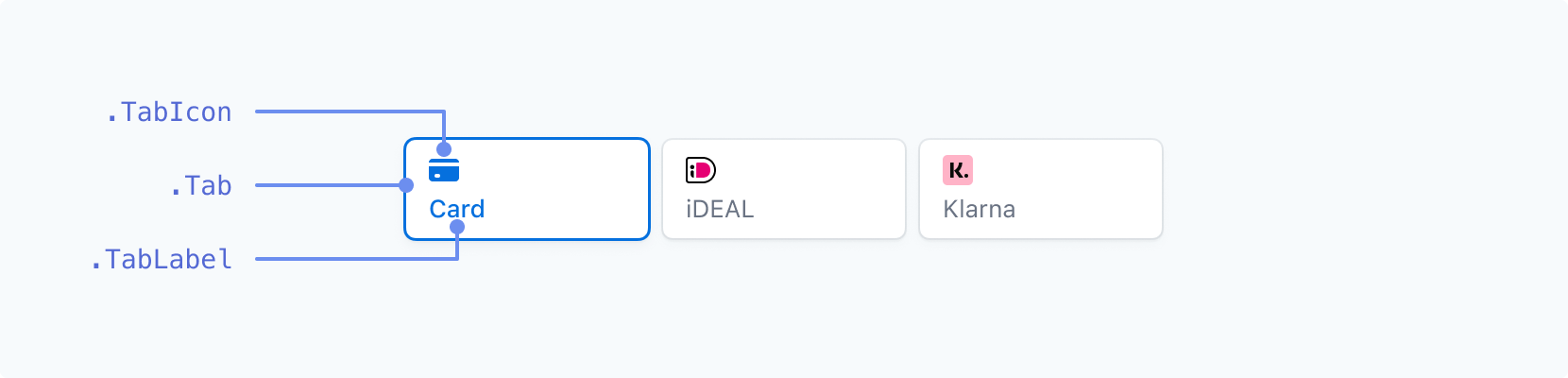
| Class name | States | Pseudo-classes | Pseudo-elements |
|---|---|---|---|
.Tab |
--selected |
:hover, :focus, :active, :disabled |
|
.TabIcon |
--selected |
:hover, :focus, :active, :disabled |
|
.TabLabel |
--selected |
:hover, :focus, :active, :disabled |
Inputs (above labels)
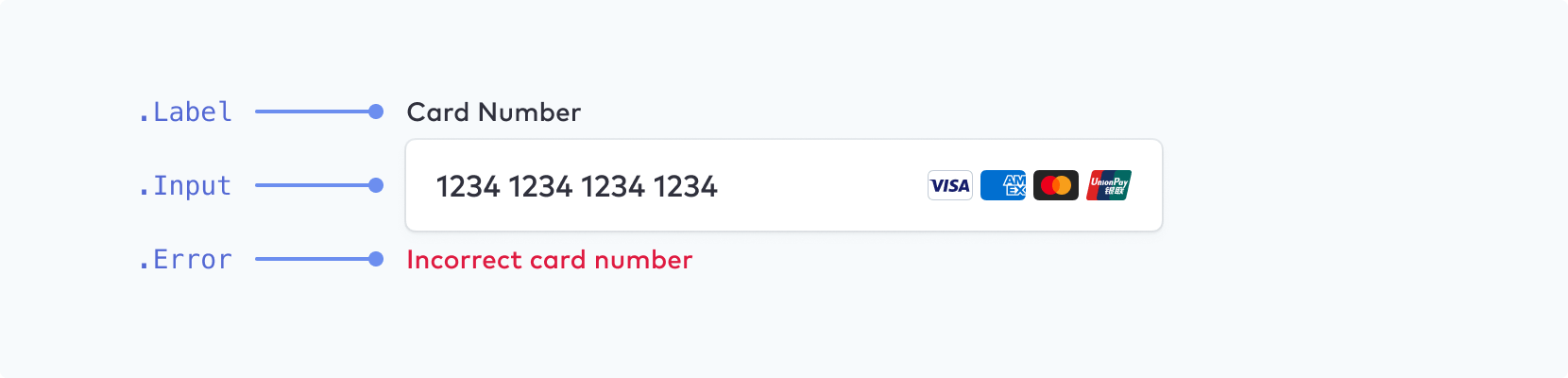
Make sure that you choose a font size of at least 16px for input fields on mobile.
| Class name | States | Pseudo-classes | Pseudo-elements |
|---|---|---|---|
.Label |
--empty, --invalid, --focused |
||
.Input |
--empty, --invalid |
:hover, :focus, :disabled, :autofill |
::placeholder, ::selection |
.Error |
Inputs (floating labels)
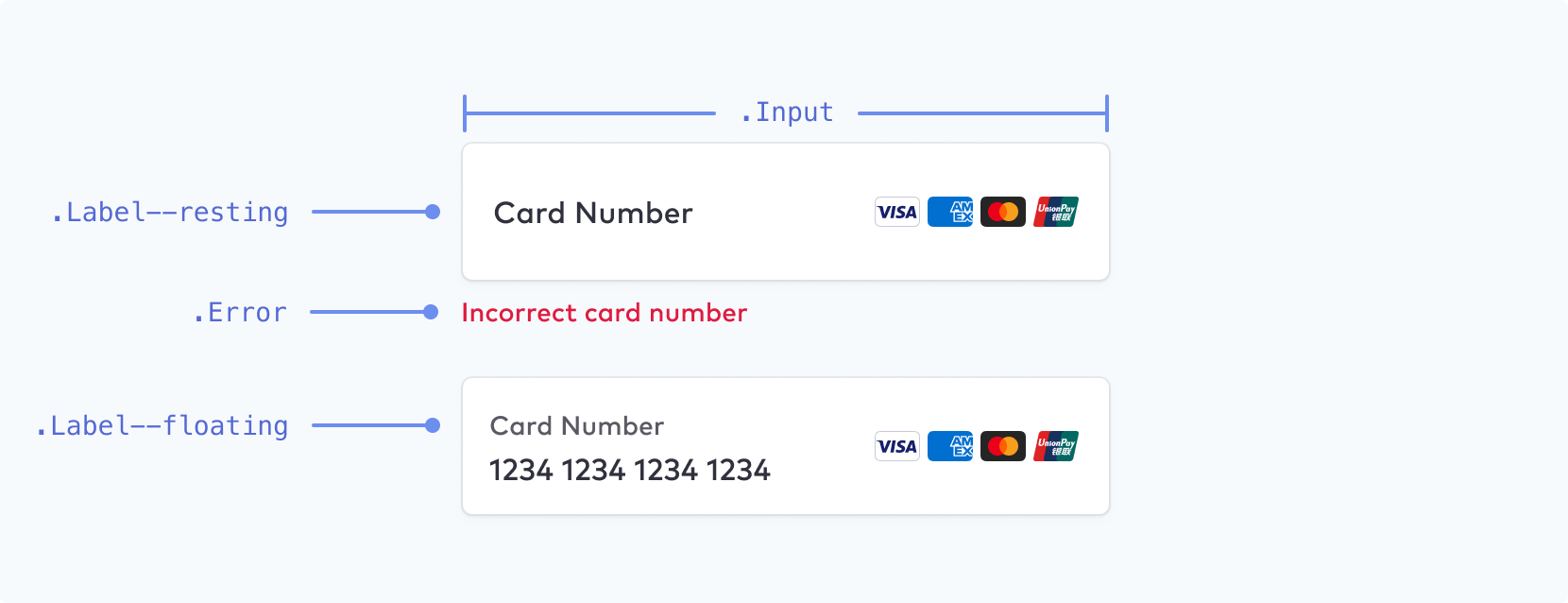
You can enable floating labels as an additional configuration option.
| Class name | States | Pseudo-classes | Pseudo-elements |
|---|---|---|---|
.Label |
--empty, --invalid, --focused, --floating, --resting |
||
.Input |
--empty, --invalid |
:hover, :focus, :disabled, :autofill |
::placeholder, ::selection |
.Error |
Block
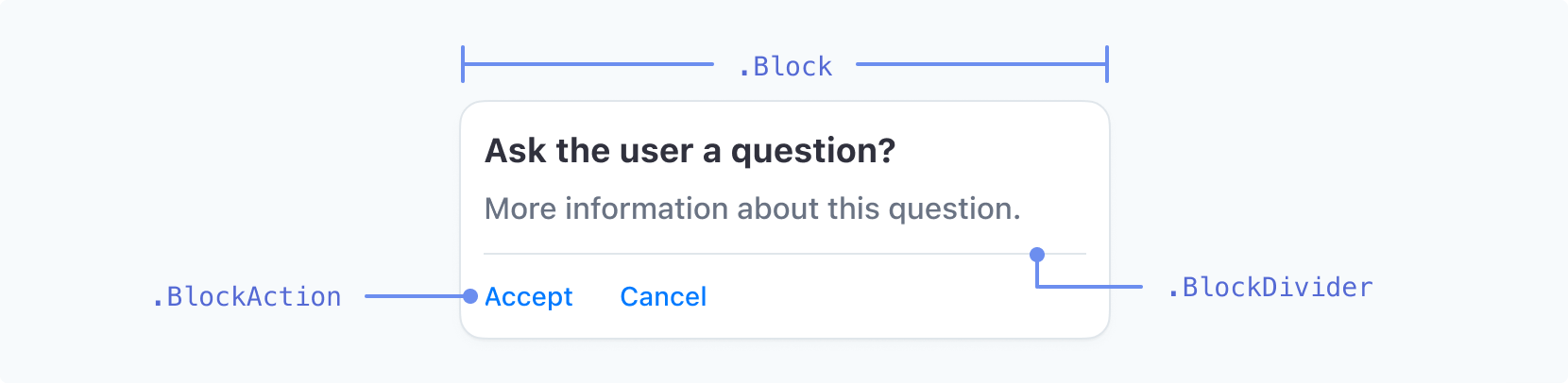
| Class name | States | Pseudo-classes | Pseudo-elements |
|---|---|---|---|
.Block |
|||
.BlockDivider |
|||
.BlockAction |
--negative |
:hover, :focus, :active |
Code Input

| Class name | States | Pseudo-classes | Pseudo-elements |
|---|---|---|---|
.CodeInput |
:hover, :focus, :disabled |
Checkbox
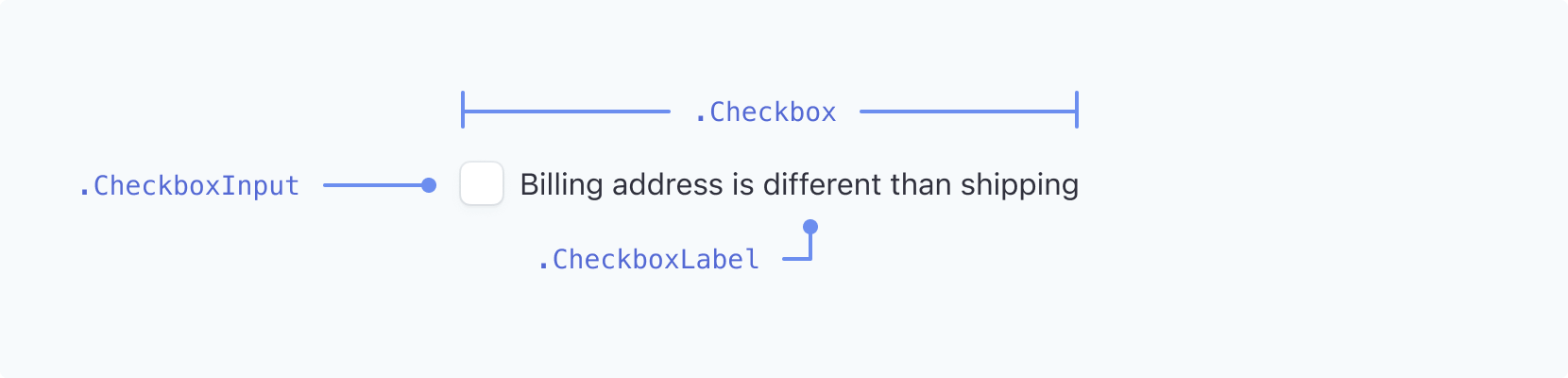
| Class name | States | Pseudo-classes | Pseudo-elements |
|---|---|---|---|
.Checkbox |
--checked |
||
.CheckboxLabel |
--checked |
:hover, :focus, :focus-visible |
|
.CheckboxInput |
--checked |
:hover, :focus, :focus-visible |
Dropdown
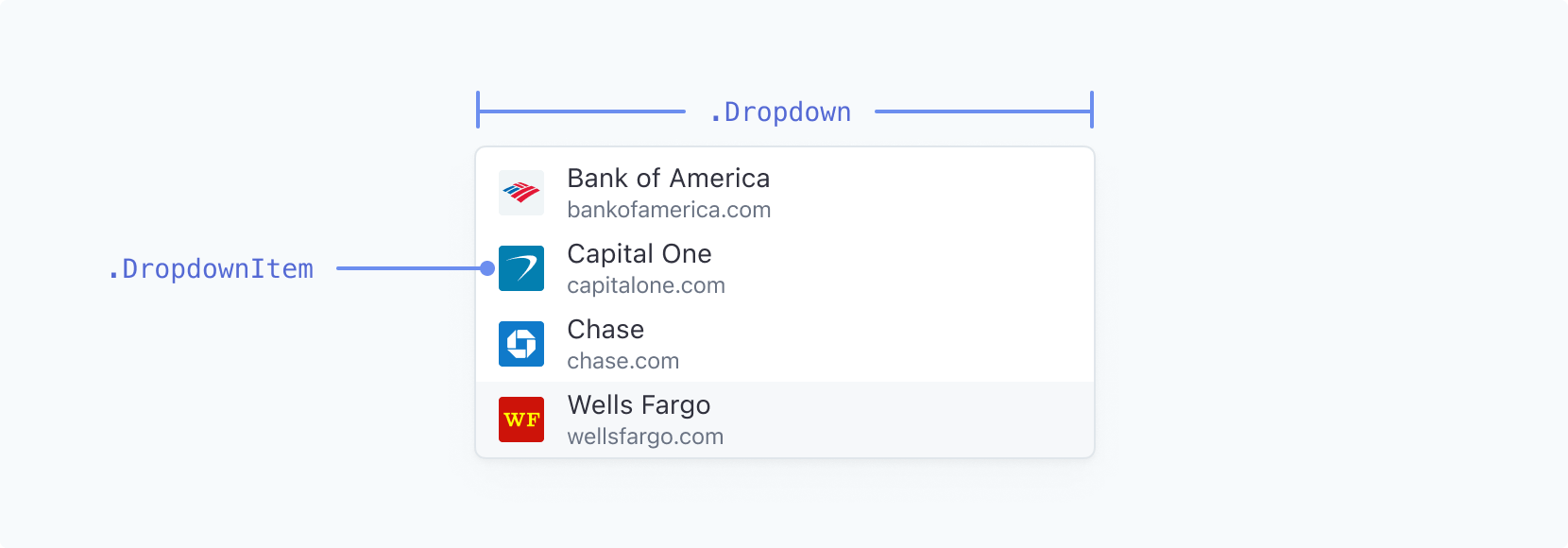
| Class name | States | Pseudo-classes | Pseudo-elements |
|---|---|---|---|
.Dropdown |
|||
.DropdownItem |
--highlight |
:active |
Dropdown styling is limited on macOS. The appearance API for dropdowns primarily affects Windows systems. On macOS, you can’t style system dropdowns, such as the country selector, using these rules because of operating system restrictions.
Switch

| Class name | States | Pseudo-classes | Pseudo-elements |
|---|---|---|---|
.Switch |
--active |
:hover |
|
.SwitchControl |
:hover |
Picker
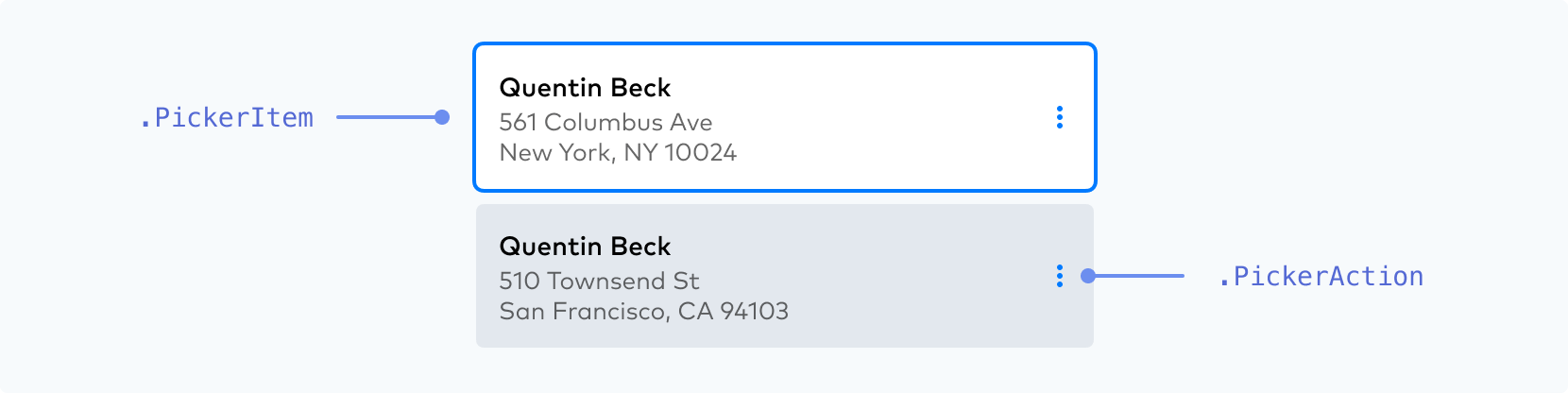
| Class name | States | Pseudo-classes | Pseudo-elements |
|---|---|---|---|
.PickerItem |
--selected, --highlight, --new, --disabled |
:hover, :focus, :active |
|
.PickerAction |
:hover, :focus, :active |
Make sure your .PickerItem active state stands out from the other states.
 |
 |
|---|---|
| DO |
Use a noticeable, high-contrast primary color, weight, and/or outline to distinguish the active state your customer has already selected. | DON’T
Don’t use two equally weighted options or low-contrast colors for your .PickerItem states because it makes distinguishing which one is active more difficult. |
Menu
| Class name | States | Pseudo-classes | Pseudo-elements |
|---|---|---|---|
.Menu |
|||
.MenuIcon |
--open |
:hover |
|
.MenuAction |
--negative |
:hover, :focus, :active |
Accordion
| Class name | States | Pseudo-classes | Pseudo-elements |
|---|---|---|---|
.AccordionItem |
--selected |
:hover, :focus-visible |
Payment Method Messaging Element
| Class name | States | Pseudo-classes | Pseudo-elements |
|---|---|---|---|
.PaymentMethodMessaging |
Radio Icon

| Class name | States | Pseudo-classes | Pseudo-elements |
|---|---|---|---|
.RadioIcon |
|||
.RadioIconOuter |
--checked, --hovered |
||
.RadioIconInner |
--checked, --hovered |
You can control the overall size of the icon with the width property on .RadioIcon. You can control the relative size of .RadioIconInner with the r (radius) property. .RadioIconOuter and .RadioIconInner are SVG elements and can be styled with stroke and fill properties. See the full list of supported CSS properties below.
const appearance = {
  rules: {
    '.RadioIcon': {
      width: '24px'
    },
    '.RadioIconOuter': {
      stroke: '#E0E6EB'
    },
    '.RadioIconInner': {
      r: '16'
    }
  }
};
Supported CSS properties
| CSS Property | Supported classes |
|---|---|
-moz-osx-font-smoothing |
AccordionItem, Action, BlockAction, Button, Checkbox, CheckboxLabel, CodeInput, DropdownItem, Error, Input, Label, Link, MenuAction, PickerAction, PickerItem, RedirectText, SecondaryLink, Tab, TabLabel, TermsLink, TermsText, Text, ToggleItem |
-webkit-font-smoothing |
AccordionItem, Action, BlockAction, Button, Checkbox, CheckboxLabel, CodeInput, DropdownItem, Error, Input, Label, Link, MenuAction, PickerAction, PickerItem, RedirectText, SecondaryLink, Tab, TabLabel, TermsLink, TermsText, Text, ToggleItem |
-webkit-text-fill-color |
AccordionItem, Action, BlockAction, Button, Checkbox, CheckboxLabel, CodeInput, DropdownItem, Error, Input, Label, Link, MenuAction, PickerAction, PickerItem, RedirectText, SecondaryLink, Tab, TabLabel, TermsLink, TermsText, Text, ToggleItem |
backgroundColor |
AccordionItem, Action, Block, BlockAction, BlockDivider, Button, CheckboxInput, CodeInput, DropdownItem, Error, Input, InputDivider, MenuAction, MenuIcon, PickerAction, PickerItem, Switch, Tab, ToggleItem |
border |
AccordionItem, Action, Block, BlockAction, Button, CheckboxInput, CodeInput, Dropdown, DropdownItem, Error, Input, MenuAction, MenuIcon, PickerAction, PickerItem, RedirectText, Switch, SwitchControl, Tab, TermsText, Text, ToggleItem |
borderBottom |
AccordionItem, Action, Block, BlockAction, Button, CheckboxInput, CodeInput, Dropdown, DropdownItem, Error, Input, MenuAction, MenuIcon, PickerAction, PickerItem, RedirectText, Switch, SwitchControl, Tab, TermsText, Text, ToggleItem |
borderBottomColor |
AccordionItem, Action, Block, BlockAction, Button, CheckboxInput, CodeInput, Dropdown, DropdownItem, Error, Input, MenuAction, MenuIcon, PickerAction, PickerItem, RedirectText, Switch, SwitchControl, Tab, TermsText, Text, ToggleItem |
borderBottomLeftRadius |
AccordionItem, Action, Block, BlockAction, Button, CheckboxInput, CodeInput, Dropdown, DropdownItem, Error, Input, MenuAction, MenuIcon, PickerAction, PickerItem, RedirectText, Switch, SwitchControl, Tab, TermsText, Text, ToggleItem |
borderBottomRightRadius |
AccordionItem, Action, Block, BlockAction, Button, CheckboxInput, CodeInput, Dropdown, DropdownItem, Error, Input, MenuAction, MenuIcon, PickerAction, PickerItem, RedirectText, Switch, SwitchControl, Tab, TermsText, Text, ToggleItem |
borderBottomStyle |
AccordionItem, Action, Block, BlockAction, Button, CheckboxInput, CodeInput, Dropdown, DropdownItem, Error, Input, MenuAction, MenuIcon, PickerAction, PickerItem, RedirectText, Switch, SwitchControl, Tab, TermsText, Text, ToggleItem |
borderBottomWidth |
AccordionItem, Action, Block, BlockAction, Button, CheckboxInput, CodeInput, Dropdown, DropdownItem, Error, Input, MenuAction, MenuIcon, PickerAction, PickerItem, RedirectText, Switch, SwitchControl, Tab, TermsText, Text, ToggleItem |
borderColor |
AccordionItem, Action, Block, BlockAction, Button, CheckboxInput, CodeInput, Dropdown, DropdownItem, Error, Input, MenuAction, MenuIcon, PickerAction, PickerItem, RedirectText, Switch, SwitchControl, Tab, TermsText, Text, ToggleItem |
borderLeft |
AccordionItem, Action, Block, BlockAction, Button, CheckboxInput, CodeInput, Dropdown, DropdownItem, Error, Input, MenuAction, MenuIcon, PickerAction, PickerItem, RedirectText, Switch, SwitchControl, Tab, TermsText, Text, ToggleItem |
borderLeftColor |
AccordionItem, Action, Block, BlockAction, Button, CheckboxInput, CodeInput, Dropdown, DropdownItem, Error, Input, MenuAction, MenuIcon, PickerAction, PickerItem, RedirectText, Switch, SwitchControl, Tab, TermsText, Text, ToggleItem |
borderLeftStyle |
AccordionItem, Action, Block, BlockAction, Button, CheckboxInput, CodeInput, Dropdown, DropdownItem, Error, Input, MenuAction, MenuIcon, PickerAction, PickerItem, RedirectText, Switch, SwitchControl, Tab, TermsText, Text, ToggleItem |
borderLeftWidth |
AccordionItem, Action, Block, BlockAction, Button, CheckboxInput, CodeInput, Dropdown, DropdownItem, Error, Input, MenuAction, MenuIcon, PickerAction, PickerItem, RedirectText, Switch, SwitchControl, Tab, TermsText, Text, ToggleItem |
borderRadius |
AccordionItem, Action, Block, BlockAction, Button, CheckboxInput, CodeInput, Dropdown, DropdownItem, Error, Input, InputCloseIcon, Link, MenuAction, MenuIcon, PasscodeCloseIcon, PasscodeShowIcon, PickerAction, PickerItem, RedirectText, SecondaryLink, Switch, SwitchControl, Tab, TermsLink, TermsText, Text, ToggleItem |
borderRight |
AccordionItem, Action, Block, BlockAction, Button, CheckboxInput, CodeInput, Dropdown, DropdownItem, Error, Input, MenuAction, MenuIcon, PickerAction, PickerItem, RedirectText, Switch, SwitchControl, Tab, TermsText, Text, ToggleItem |
borderRightColor |
AccordionItem, Action, Block, BlockAction, Button, CheckboxInput, CodeInput, Dropdown, DropdownItem, Error, Input, MenuAction, MenuIcon, PickerAction, PickerItem, RedirectText, Switch, SwitchControl, Tab, TermsText, Text, ToggleItem |
borderRightStyle |
AccordionItem, Action, Block, BlockAction, Button, CheckboxInput, CodeInput, Dropdown, DropdownItem, Error, Input, MenuAction, MenuIcon, PickerAction, PickerItem, RedirectText, Switch, SwitchControl, Tab, TermsText, Text, ToggleItem |
borderRightWidth |
AccordionItem, Action, Block, BlockAction, Button, CheckboxInput, CodeInput, Dropdown, DropdownItem, Error, Input, MenuAction, MenuIcon, PickerAction, PickerItem, RedirectText, Switch, SwitchControl, Tab, TermsText, Text, ToggleItem |
borderStyle |
AccordionItem, Action, Block, BlockAction, Button, CheckboxInput, CodeInput, Dropdown, DropdownItem, Error, Input, MenuAction, MenuIcon, PickerAction, PickerItem, RedirectText, Switch, SwitchControl, Tab, TermsText, Text, ToggleItem |
borderTop |
AccordionItem, Action, Block, BlockAction, Button, CheckboxInput, CodeInput, Dropdown, DropdownItem, Error, Input, MenuAction, MenuIcon, PickerAction, PickerItem, RedirectText, Switch, SwitchControl, Tab, TermsText, Text, ToggleItem |
borderTopColor |
AccordionItem, Action, Block, BlockAction, Button, CheckboxInput, CodeInput, Dropdown, DropdownItem, Error, Input, MenuAction, MenuIcon, PickerAction, PickerItem, RedirectText, Switch, SwitchControl, Tab, TermsText, Text, ToggleItem |
borderTopLeftRadius |
AccordionItem, Action, Block, BlockAction, Button, CheckboxInput, CodeInput, Dropdown, DropdownItem, Error, Input, MenuAction, MenuIcon, PickerAction, PickerItem, RedirectText, Switch, SwitchControl, Tab, TermsText, Text, ToggleItem |
borderTopRightRadius |
AccordionItem, Action, Block, BlockAction, Button, CheckboxInput, CodeInput, Dropdown, DropdownItem, Error, Input, MenuAction, MenuIcon, PickerAction, PickerItem, RedirectText, Switch, SwitchControl, Tab, TermsText, Text, ToggleItem |
borderTopStyle |
AccordionItem, Action, Block, BlockAction, Button, CheckboxInput, CodeInput, Dropdown, DropdownItem, Error, Input, MenuAction, MenuIcon, PickerAction, PickerItem, RedirectText, Switch, SwitchControl, Tab, TermsText, Text, ToggleItem |
borderTopWidth |
AccordionItem, Action, Block, BlockAction, Button, CheckboxInput, CodeInput, Dropdown, DropdownItem, Error, Input, MenuAction, MenuIcon, PickerAction, PickerItem, RedirectText, Switch, SwitchControl, Tab, TermsText, Text, ToggleItem |
borderWidth |
AccordionItem, Action, Block, BlockAction, Button, CheckboxInput, CodeInput, Dropdown, DropdownItem, Error, Input, MenuAction, MenuIcon, PickerAction, PickerItem, RedirectText, Switch, SwitchControl, Tab, TermsText, Text, ToggleItem |
boxShadow |
AccordionItem, Action, Block, BlockAction, Button, CheckboxInput, CodeInput, Dropdown, DropdownItem, Error, Input, InputCloseIcon, Link, MenuAction, MenuIcon, PasscodeCloseIcon, PasscodeShowIcon, PickerAction, PickerItem, SecondaryLink, Switch, SwitchControl, Tab, TermsLink, ToggleItem |
color |
AccordionItem, Action, BlockAction, Button, Checkbox, CheckboxLabel, CodeInput, DropdownItem, Error, Input, Label, Link, MenuAction, PickerAction, PickerItem, RedirectText, SecondaryLink, Tab, TabIcon, TabLabel, TermsLink, TermsText, Text, ToggleItem |
fill |
Action, BlockAction, Button, CodeInput, DropdownItem, Error, Input, MenuAction, MenuIcon, PickerAction, PickerItem, RadioIconInner, RadioIconOuter, SwitchControl, Tab, TabIcon, ToggleItem |
fillOpacity |
RadioIconInner, RadioIconOuter |
fontFamily |
AccordionItem, Action, BlockAction, Button, Checkbox, CheckboxLabel, CodeInput, DropdownItem, Error, Input, Label, Link, MenuAction, PickerAction, PickerItem, RedirectText, SecondaryLink, Tab, TabLabel, TermsLink, TermsText, Text, ToggleItem |
fontSize |
AccordionItem, Action, BlockAction, Button, Checkbox, CheckboxLabel, CodeInput, DropdownItem, Error, Input, Label, Link, MenuAction, PickerAction, PickerItem, RedirectText, SecondaryLink, Switch, Tab, TabLabel, TermsLink, TermsText, Text, ToggleItem |
fontVariant |
AccordionItem, Action, BlockAction, Button, Checkbox, CheckboxLabel, CodeInput, DropdownItem, Error, Input, Label, Link, MenuAction, PickerAction, PickerItem, RedirectText, SecondaryLink, Tab, TabLabel, TermsLink, TermsText, Text, ToggleItem |
fontWeight |
AccordionItem, Action, BlockAction, Button, Checkbox, CheckboxLabel, CodeInput, DropdownItem, Error, Input, Label, Link, MenuAction, PickerAction, PickerItem, RedirectText, SecondaryLink, Tab, TabLabel, TermsLink, TermsText, Text, ToggleItem |
letterSpacing |
AccordionItem, Action, BlockAction, Button, Checkbox, CheckboxLabel, CodeInput, DropdownItem, Error, Input, Label, Link, MenuAction, PickerAction, PickerItem, RedirectText, SecondaryLink, Tab, TabLabel, TermsLink, TermsText, Text, ToggleItem |
lineHeight |
AccordionItem, Action, BlockAction, Button, Checkbox, CheckboxLabel, CodeInput, DropdownItem, Error, Input, Label, Link, MenuAction, PickerAction, PickerItem, RedirectText, SecondaryLink, Tab, TabLabel, TermsLink, TermsText, Text, ToggleItem |
margin |
Action, BlockAction, Button, CodeInput, DropdownItem, Error, Input, Label, MenuAction, PickerAction, PickerItem, Tab, ToggleItem |
marginBottom |
Action, BlockAction, Button, CodeInput, DropdownItem, Error, Input, Label, MenuAction, PickerAction, PickerItem, Tab, ToggleItem |
marginLeft |
Action, BlockAction, Button, CodeInput, DropdownItem, Error, Input, Label, MenuAction, PickerAction, PickerItem, Tab, ToggleItem |
marginRight |
Action, BlockAction, Button, CodeInput, DropdownItem, Error, Input, Label, MenuAction, PickerAction, PickerItem, Tab, ToggleItem |
marginTop |
Action, BlockAction, Button, CodeInput, DropdownItem, Error, Input, Label, MenuAction, PickerAction, PickerItem, Tab, ToggleItem |
opacity |
Label |
outline |
AccordionItem, Action, Block, BlockAction, Button, CheckboxInput, CodeInput, Dropdown, DropdownItem, Error, Input, InputCloseIcon, Link, MenuAction, MenuIcon, PasscodeCloseIcon, PasscodeShowIcon, PickerAction, PickerItem, SecondaryLink, Switch, SwitchControl, Tab, TermsLink, ToggleItem |
outlineOffset |
AccordionItem, Action, Block, BlockAction, Button, CheckboxInput, CodeInput, Dropdown, DropdownItem, Error, Input, InputCloseIcon, Link, MenuAction, MenuIcon, PasscodeCloseIcon, PasscodeShowIcon, PickerAction, PickerItem, SecondaryLink, Switch, SwitchControl, Tab, TermsLink, ToggleItem |
padding |
AccordionItem, Action, Block, BlockAction, Button, CodeInput, DropdownItem, Error, Input, Label, Menu, MenuAction, MenuIcon, PickerAction, PickerItem, RedirectText, Tab, TabIcon, TabLabel, TermsText, Text, ToggleItem |
paddingBottom |
AccordionItem, Action, Block, BlockAction, Button, CodeInput, DropdownItem, Error, Input, Label, Menu, MenuAction, MenuIcon, PickerAction, PickerItem, RedirectText, Tab, TabIcon, TabLabel, TermsText, Text, ToggleItem |
paddingLeft |
AccordionItem, Action, Block, BlockAction, Button, CodeInput, DropdownItem, Error, Input, Label, Menu, MenuAction, MenuIcon, PickerAction, PickerItem, RedirectText, Tab, TabIcon, TabLabel, TermsText, Text, ToggleItem |
paddingRight |
AccordionItem, Action, Block, BlockAction, Button, CodeInput, DropdownItem, Error, Input, Label, Menu, MenuAction, MenuIcon, PickerAction, PickerItem, RedirectText, Tab, TabIcon, TabLabel, TermsText, Text, ToggleItem |
paddingTop |
AccordionItem, Action, Block, BlockAction, Button, CodeInput, DropdownItem, Error, Input, Label, Menu, MenuAction, MenuIcon, PickerAction, PickerItem, RedirectText, Tab, TabIcon, TabLabel, TermsText, Text, ToggleItem |
r |
RadioIconInner |
stroke |
RadioIconInner, RadioIconOuter |
strokeOpacity |
RadioIconInner, RadioIconOuter |
strokeWidth |
RadioIconInner, RadioIconOuter |
textAlign |
PaymentMethodMessaging |
textDecoration |
AccordionItem, Action, BlockAction, Button, Checkbox, CheckboxLabel, CodeInput, DropdownItem, Error, Input, Label, Link, MenuAction, PickerAction, PickerItem, RedirectText, SecondaryLink, Tab, TabLabel, TermsLink, TermsText, Text, ToggleItem |
textShadow |
AccordionItem, Action, BlockAction, Button, Checkbox, CheckboxLabel, CodeInput, DropdownItem, Error, Input, Label, Link, MenuAction, PickerAction, PickerItem, RedirectText, SecondaryLink, Tab, TabLabel, TermsLink, TermsText, Text, ToggleItem |
textTransform |
AccordionItem, Action, BlockAction, Button, Checkbox, CheckboxLabel, CodeInput, DropdownItem, Error, Input, Label, Link, MenuAction, PickerAction, PickerItem, RedirectText, SecondaryLink, Tab, TabLabel, TermsLink, TermsText, Text, ToggleItem |
transition |
Action, Block, BlockAction, Button, CheckboxInput, CheckboxLabel, CodeInput, Dropdown, DropdownItem, Error, Icon, Input, InputCloseIcon, Label, Link, MenuAction, MenuIcon, PasscodeCloseIcon, PasscodeShowIcon, PickerAction, PickerItem, RadioIconInner, RadioIconOuter, RedirectText, SecondaryLink, Switch, SwitchControl, Tab, TabIcon, TabLabel, TermsLink, TermsText, Text, ToggleItem |
width |
RadioIcon |
Some exceptions to the properties above are:
-webkit-text-fill-colorisn’t compatible with pseudo-classes
Other configuration options
In addition to themes, labels, inputs, variables and rules, you can style Elements using other appearance configuration options.
You can customize these by adding them to the appearance object:
const appearance = {
  disableAnimations: true,

  // other configurations such as `theme`, `labels`, `inputs`, `variables` and `rules`...
}
We currently support the below options:
| Configuration | Description |
|---|---|
disableAnimations |
Disables animations throughout Elements. Boolean, defaults to false. |